A bug fix this week opened up bigger conversations about UX tradeoffs, first principles, and system design.
What started as a fix turned into 3 key milestones — each one clarifying what matters most in the product.
The bug was around state being lost in our front-end app. The fix was straightforward – re-fetch the data from the API.
1. Data may not be available anymore.
The API is returning JSON blobs from a model, being produced every minute. Refetching might mean that the data is gone.
– If we cache it, the data may be stale.
– One first principle: data must be real-time and useful.
We considered redirecting the user back to the landing page to restart the flow.
2. Not great UX?
– Redirecting users without explanation isn’t ideal.
UX and I talked about adding more copy about what happened and giving context.
– We settled on clear, simple copy to keep the UI clear.
3. Could users miss out on data?
UX was front-of-mind at this point, I wondered if a user was missing out on data?
– We debated changing the model or storing the data differently.
– We could flatten the data and store it sequentially.
– But that would impact internal calculations and they were vital.
We decided to keep the existing data architecture.
Lessons learned:
– Tradeoffs deserve time. Rushing decisions often means missing hidden costs.
– Technical choices ripple into UX and product – talk early, not under pressure.
– First principles matter. They keep decisions honest.
If you’re designing flows like this, I’d love to hear what worked for you.
Category: Technology
Hug A Platform Engineer or IT Support or Network Support Today.
Well. Within reason. Don’t get fired.
But I learned early in my career that your platform engineer, IT support, network engineer are your allies. You’ll need them one day when you’re in a bind. The quality of your relationship with them will be directly proportional to how and how much they show up for you.
If I had treated those relationships like a short-term transaction, eh, I don’t need them right now. Whatever. That day I have a production issue on a Friday at 3pm? If I invested unwisely, that same person will just wish me luck and go about their merry way.
But if I invest in the relationship with the long game in mind, that same engineer may sit next to me while a pod is burning like a raccoon-infested dumpster fire.
Nitpicks in PR Reviews
What’s your relationship with nitpicks in PR reviews?
I’ve noticed a shift in how I respond to them. Where I used to feel defensive and nervous that I’ve missed something obvious, I now see them as part of a conversation about quality — not just correctness.
A coworker once explained his approach to PRs: “Could this be clearer? More consistent? Easier to understand?” That framing helped shift how I think about nitpicks.
Instead of feeling like threats, they’ve started to feel useful. I’ve found myself recently remembering past suggestions and folding them into my work before they’re even mentioned again.
Hable Con El
This week, I’ve been paying closer attention to how I talk about LLMs.
One change I’ve made: I stopped using product names or referring to them like they’re people. Instead of saying something like “ChatGPT suggested…”, I just say ‘an LLM’, as in: “I consulted an LLM” or “This is from an LLM.” It’s a tool, not a person. And once I start treating it like a person, I start assigning it human traits—like assuming it won’t make mistakes.
That shift came into focus during a conversation with a friend, who’s also an engineer. I mentioned that a code snippet from an LLM had a bug, and caught myself feeling oddly surprised. My coworker joked, “Don’t you introduce bugs too?” That snapped it into place—I’d let some unconscious expectations creep in.
I also started changing how I write about LLMs. Saying “This is what an LLM produced” or “Here’s a suggestion from an LLM” helps me keep the right level of distance. It reminds me that I’m still the one responsible for what goes in, what comes out, and how it’s used. The tool doesn’t absolve me of accountability.
Curious if others have noticed similar things. How do you talk about or work with LLMs and AI tools day-to-day?
Part 1 – Lessons Learned From a React Native App in Production

This is a first in a (possibly!) running series about maintaining and developing a React Native app in production.
Part 1: Lessons Learned
Questions or improvements? Open an issue on the repo or e-mail me.
Automating OpenApi Spec Validation with Gradle and Spring Boot
Recently, the front-end team I’m on really saw how the back-end team was swamped. During the sprint retro, we expressed that we wanted to help out any way we could. So, with their help, we got set up in IntelliJ and back-end’s Spring Boot application. My team ended up getting wrapped up in our main projects. I put aside some time on my own to look at back-end’s backlog. After touching base with them and seeing where I could best help them, I picked up a technical debt ticket around automating the validation of the OpenAPI spec.
It was really a great adventure and learning opportunity! I had never worked before with Gradle and Spring Boot in any professional capacity, but I know my way around Gradle now. 😀
The requirements were:
- the validation would be automated
- it could be integrated into the CI/CD flow with GitHub actions
At first, I fell down a deep rabbit hole with trying to implement a custom Gradle Task with plain Java files. The Gradle 8.4 documentation actually pointed people to write them in Groovy or Kotlin, but I think I must have hit a random blog through a Google search, and gotten stuck there. I’m sure it could have worked, but I had already surpassed my initial timebox.
Then, I tried to solve it the simplest way, by using the springdoc-OpenAI Gradle plugin. But that required to run the application, and we wanted to avoid that in the CI/CD flow.
Finally, I went back to the original concept of custom Gradle Tasks, but kept it simple with plain Groovy. Then, I found the winning combination. A blog suggested validating the OpenAPI spec in test cases. The final solution was as follows:
- Writing custom Gradle Tasks in plain Groovy that executed test cases
- This case would manually generate the OpenAPI spec from the code
- Then executing a local shell script that loads a npm library to manually validate the generated spec.
It’s lightweight, it can run easily in a CI/CD flow, and implementing it with straight Groovy keeps the `build.gradle` file light.
I added the custom task to the gradlew command in the appropriate GitHub Action workflow file.
I added the variables extraction.api-spec.json and springdoc.api-docs.path to the application.properties file.
build.gradle
tasks.register("validateOpenApiDocs", Exec) {

    group = "documentation"

    description = "Validates locally generated OpenApi spec"

    def stdout = new ByteArrayOutputStream()

    ignoreExitValue true

    doFirst() {

        println "Validating generated Open API docs..."

    }

    commandLine './validate-docs.sh'

    doLast() {

        ObjectMapper mapper = new ObjectMapper();

        JsonNode taskResult = mapper.readTree(stdout.toString())

        if (taskResult.valid.equals(false)) {

            println "FAILED"

            println taskResult.errors

        } else {

            println "OpenAPI spec validation passed!"

        }

    }

}
validate-docs.sh
#!/bin/bash

npx -p @seriousme/openapi-schema-validator validate-api docs.json
ApiSpecJsonFileExtractor.java
@SpringBootTest

@ActiveProfiles("test")

public class ApiSpecJsonFileExtractor {

  @Value("${extraction.api-spec.json}")

  String filename;

  @Value("${springdoc.api-docs.path}")

  String apiDocJsonPath;

<snip>

  MockMvc mvc;

  @BeforeEach

  public void setup() {

    mvc = MockMvcBuilders.webAppContextSetup(context).apply(springSecurity()).build();

  }

  @Test

  void extractApiSpecJsonFile() throws Exception {

    File file = new File(filename);

    Path filePath = file.toPath();

    if (file.exists()) {

      Assertions.assertThat(file.isFile()).isTrue();

    } else {

      Path path = file.getParentFile().toPath();

      if (Files.notExists(path)) {

        Files.createDirectory(path);

      }

      if (Files.notExists(filePath)) {

        Files.createFile(file.toPath());

      }

    }

    mvc.perform(MockMvcRequestBuilders.get(apiDocJsonPath))

        .andDo(

            result ->

                Files.write(file.toPath(), result.getResponse().getContentAsString().getBytes()));

  }

}Mastering TypeScript Errors
Despite working with TypeScript professionally since 2019, I’ve been approaching TypeScript errors with a great deal of trepidation and fear. There’s so much information being returned. Although it’s not as much as Java stack traces in volume, I’ve struggled to make sense of TypeScript error traces and know how to parse them. Whereas most of the time I could resolve most errors with varying amounts of brute force or logic, sometimes a TypeScript error trace can really leave me clueless.
So, this week presented me with a golden opportunity to face some fears and turn trepidation into budding confidence. I was working with the react-select package and some custom components in the codebase. I was making some modifications and I was confronted with the Great Wall of Error.
Something like these…
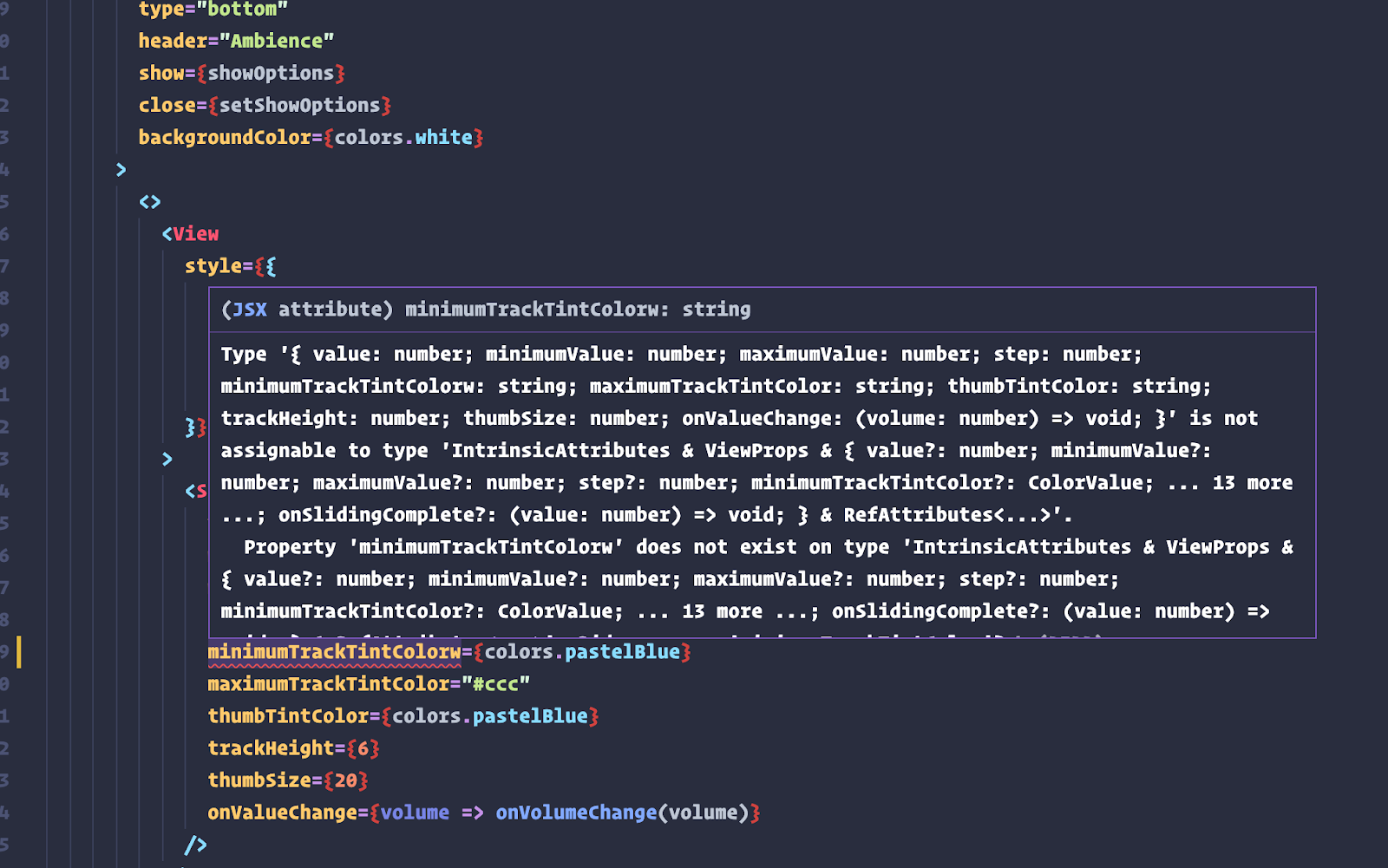
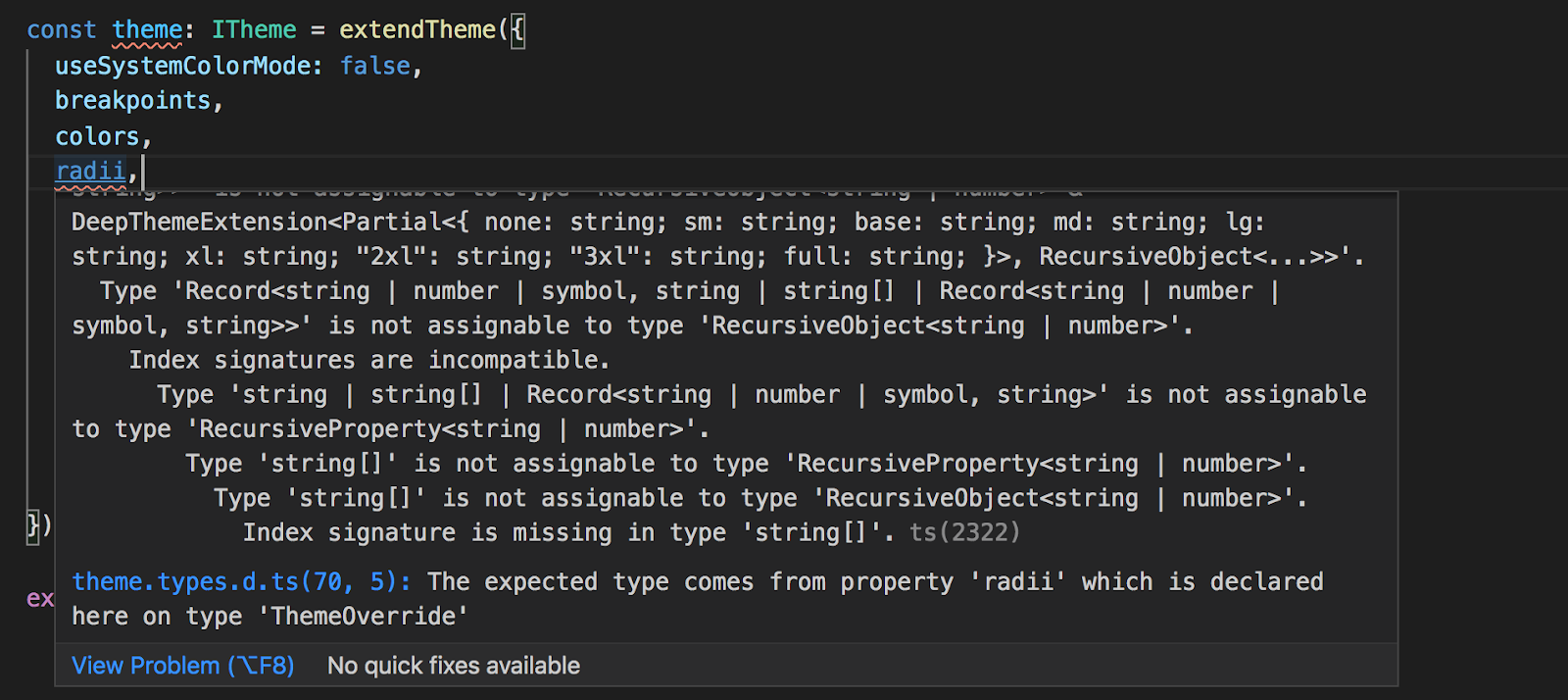
Instead of freaking out at the Great Wall, I decided to break it down and make sense of it. I need to spend more time on the TypeScript website because the documentation on understanding errors is really excellent.
This part really started to solve the primordial puzzle for me:
“Each error starts with a leading message, sometimes followed by more sub-messages. You can think of each sub-message as answering a “why?” question about the message above it.” (emphasis mine)
If we take the second screenshot as an example, the way to parse the error trace seems to be as follows:
- TypeScript will highlight the offending line with a red squiggly line.
- Top message in the error trace is the leading message. In this case, it’s Type ‘Record<string | number | symbol, string | string[] | Record<string | number | symbol, string>>’ is not assignable to type ‘RecursiveObject<string | number>’.
- Why? Because Index signatures are incompatible.
- Why? Because Type ‘string | string[] | Record<string | number | symbol, string>’ is not assignable to type ‘RecursiveProperty<string | number>’.
And so on.
I’m going to be taking these insights into my work next week and side projects.
So, thank you TypeScript website!
More About Code Reviews, Impostor Syndrome, and Growing from Code Reviews
Following on from my last post, I saw a co-worker gracefully apply the principles of sound code reviews. It was comforting to see someone else on the same path as me. I observed myself while reading his comments. I didn’t feel attacked or questioned. His tone was curious and thoughtful.
I’ve observed this week that seeing code reviews as a part of engineering work, equal in value to coding and delivery, is starting to influence me. My thinking used to be upon submitting pull requests:
This meets the requirements.
This is as elegant and succinct as I am aware.
This passes tests.
Then, I would feel ashamed when comments come in about did you consider this? Why did you choose that? My internal dialogue became, I should have known this.
But the truth is that I often don’t have the full picture in my head of the entire codebase, or more experience, or the unique insights of another engineer. I only know what I’m operating on right now… if I’m not growing.
It got me thinking about a recent newsletter by The Hybrid Hacker entitled Dealing with Impostor Syndrome in the Engineering World. It was a uncomfortable, unsettling read in that it hit home deeply. I put exceedingly high expectations and requirements on myself to have thought of everything before a code review. And that’s simply impossible.
However, I can start to learn what my coworkers pick up on and ask questions about. Mining that can make me more thoughtful and compel me to improve. Learn more. Explore more. Skill up.
My wish with my new role was that I would get to work with senior engineers, to really level up my game, to sharpen steel against steel. And that has been fulfilled. For that, I’m grateful!
Getting Code Reviews Right
This is a few days late, but wanted to write it anyway to keep the discipline and routine going.
I subscribe to several really high-quality newsletters and one post last week was of immense use. It was Exactly What to Say in Code Reviews by Jordan Cutler.
Getting the tone, content, and style right in code reviews is a significant part of collaborating in engineering teams. It involves many trial-and-error iterations, a lot of self-reflection, and an understanding of the culture of the team you’re on.
So, Jordan’s post was like getting a well-constructed, time-tested, and solid toolbox for Christmas, for this part of engineering work.
I applied some of the principles while doing code reviews last week. I actually brought up the post and put it side-by-side with the pull requests.
Judging by my coworkers’ replies and comments, I knew that I had carried out some effective strategies.
Thank you, Jordan!
Examining What Is Important To Work On In Software Projects
I observed this week several vectors acting on my thinking. It’s important to focus on the product and the overall mission, as I said last week. That’s the main vector. But then, you look at the active sprint, and you look at what else is left. Low priority tasks left there as low-hanging fruit. Second vector comes in – I want to work on something that is valuable to the team and organization, something that advances the main vector.
So, I look at the backlog and look at the bigger tasks, not prioritized in the current sprint. There are still tickets there, needed to get the release over the finish line. Bigger tasks like API integrations or outstanding features. So, then you weigh up the first two vectors. Something valuable, preferably not low-hanging fruit, and something that advances the product. By my own internal logic, picking up something from the backlog makes sense then.
And this is where internal logic is not not sound, but defies a third important vector – team norms and culture. What does the team do? What is accepted in the team? And there, internal logic – even if sound – can come up short with team norms. In some teams, it’s acceptable and encouraged, on some level, to pick up tasks from the backlog. But in others, it’s not if it wasn’t included in the initial sprint planning and not added later during sprint refinement.
There is no actionable method on offer here. Thinking through things, as you navigate a new role and organization, will help you identify the important vectors at play and your own internal logic.